Modern Company Profile
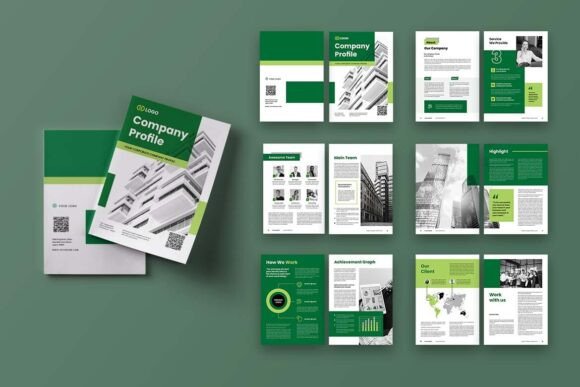
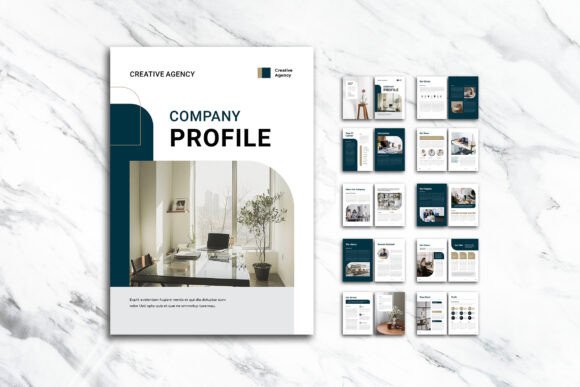
When you need a polished, print-ready document that balances visual storytelling with clear information, the Modern Company Profile InDesign template often catches the eye. It’s a 12-page A4 layout built to present images, infographics, and text in a clean, sophisticated way. The promise is straightforward: a professional foundation that saves time, whether you’re a startup founder, a marketing manager, or a freelancer putting together a capabilities statement. But simply owning a well-designed template doesn’t guarantee a result that feels thoughtful and on-brand. The gap between a great template and a great final product is where many people stumble – often without realizing it until they’re holding a printed copy or sending a PDF that fails to communicate the right impression.
This isn’t about blaming the template. The structure is solid, with neatly organized layers, smart object placement, bleed, and CMYK color space already set up. The pitfalls usually come from overlooking practical details, misunderstanding how the file works, or making avoidable design and content decisions. Let’s walk through what can go wrong and, more importantly, how to get it right so you can leverage the Modern Company Profile template to its full potential.
Treating the Template as a Finished Product
One of the most frequent missteps is assuming that because the layout looks striking in the preview, it will automatically convey your company’s unique value. The template provides a visual framework – the arrangement of columns, the infographic charts, the image placeholders – but the real substance must come from your own messaging and visuals. Leaving the dummy text intact or swapping images without adjusting the narrative creates a disconnect. The reader might sense that something is off, even if they can’t name it. The result is a profile that feels generic, which undermines trust and doesn’t differentiate you from competitors who may be using the same template.
Instead, approach the template like a bespoke suit. The cut is excellent, but it needs tailoring. Replace every word of placeholder copy with original content that speaks directly to your audience. If the template includes a timeline infographic, don’t just keep the sample dates – use your actual milestones. When you customize the headlines, think about what matters to the person reading. A design studio might emphasize creative philosophy; a logistics firm should foreground reliability and scale. The template’s strength is that it supports your message without dictating it. Give it something real to say.
Ignoring Color Profiles and Bleed Until It’s Too Late
Another costly oversight happens right before export. The Modern Company Profile file is built in CMYK color mode at 300 DPI, with a 3 mm bleed – all standard for high-quality offset or digital printing. However, many users send the document to a printer without confirming that the export settings match the print shop’s requirements. If you accidentally export in RGB, colors can shift dramatically when converted, turning a carefully chosen teal into a murky green. Forgetting to include bleed marks or not extending background elements into the bleed area often leads to thin white strips along the edges after trimming, which immediately signals amateur production.
Before you finalize anything, open the “Document Setup” in InDesign and double-check that the bleed is set correctly (and that your backgrounds, photos, and color blocks actually extend to the red bleed guide). When exporting to PDF, use a preset like “PDF/X-4” or “Press Quality,” ensure “Use Document Bleed Settings” is checked, and confirm that the output is CMYK. If you’re uncertain about the printer’s specs, ask for their preferred profile. It’s a small step that prevents the disappointment of receiving a batch of brochures that look nothing like your screen.
Underestimating Font Management
The template uses free fonts from sources like DaFont or Google Fonts, which is a practical choice – no extra licensing fees. But because these fonts are not automatically embedded in a way that travels with the file on every system, you must install them on your computer before you open the document. Skipping this step results in InDesign substituting a default typeface, often silently. You might not notice until you’ve made several edits and suddenly realize the elegant sans-serif you loved has been replaced by a basic system font that wrecks the carefully planned hierarchy and spacing.
Even worse, if you send the packaged file to a colleague or printer without including the font files, they’ll see the substitution and likely won’t know what’s missing. The smart approach is to download and install every font listed in the template’s documentation. Then, when you’re ready to share working files, use InDesign’s “Package” function to collect fonts and links. For final PDFs, outline the text if necessary, but always keep an editable version with live type for future updates. This preserves the professional look and makes collaboration painless.
Overcrowding the Layout
A design that already balances infographics, text, and images can quickly feel heavy when you try to cram in too much information. The Modern Company Profile template is arranged with generous spacing and a clear visual rhythm. A typical mistake is reducing font sizes to squeeze in two extra paragraphs or adding extra charts that the grid wasn’t meant to accommodate. The result is a cluttered page that’s hard to scan. People rarely read company profiles word-for-word; they skim. Dense walls of text defeat that purpose and make key points harder to absorb.
Resist the urge to fill every available pixel. If a section covers services, pick the three or four that matter most and describe them with concise, benefit-driven copy. Use the existing infographic elements to highlight statistics, not to display every metric your business tracks. If you need more depth, consider expanding the document to the full 12 pages or linking to a website for case studies. White space isn’t wasted space – it’s what gives the content room to breathe and helps the reader focus on what you really want them to remember.
Using Images That Don’t Match the Visual Standard
The preview images in the template are carefully curated – they’re not included in the download, but they set a visual expectation. Replacing them with low-resolution photos, awkwardly cropped stock images, or pictures that don’t share a consistent color palette can wreck the cohesive feel. Because the layout relies heavily on large, impactful visuals, weak images stand out for all the wrong reasons. A pixelated hero shot on the cover tells the reader your company isn’t paying attention to detail, which is the opposite of what you want to convey.
Invest time in sourcing or creating images that are at least 300 DPI at the final print size. If you’re placing photos into the image frames, use high-quality royalty-free assets or commission custom photography if the budget allows. Pay attention to the color temperature and tone – a warm, soft-focus image next to a crisp, cool-toned infographic can feel disjointed. Small adjustments, like applying a consistent black-and-white treatment or a subtle duotone, can tie disparate images together. Remember, the template’s elegance shines brightest when the imagery is equally deliberate.
Forgetting That the Template Is a Starting Point for Iteration
Even after you’ve customized the content, colors, and images, it’s tempting to consider the job done. But a company profile is rarely a static document. Your business evolves, and a layout that worked well last quarter may need updates to reflect new clients, certifications, or a refined brand direction. A common mistake is to treat the InDesign file as a one-off project, saving flattening copies and losing the structured layers. Months later, when you need to swap a team photo or update a certification logo, you’re stuck rebuilding sections from scratch.
Keep the original .indd file and any linked resources well-organized. Use the smart layers as intended – place imagery on clearly named layers, keep text frames un-merged, and save incremental versions with dates. This habit allows you to make quick, confident edits without disturbing the rest of the layout. It also gives you the flexibility to test different visual approaches without fear of breaking the design. The real value of a template like Modern Company Profile is not just its initial appearance, but how it can grow with your business when managed thoughtfully.
What to Check Before You Commit
If you’re considering this template for an upcoming project, a few pre-flight checks will save you from common regrets. First, confirm that you have access to Adobe InDesign – this isn’t editable in free software like Canva or Google Slides. The .indd and .idml files are designed specifically for InDesign’s typographic and layout tools. Second, ask yourself whether the A4 format matches your distribution needs. While it’s perfect for print and standard PDFs, adapting the layout to a US Letter size or a square digital brochure requires extra work that the template doesn’t automate.
Also, look closely at the 12-page structure. The front and back covers are part of the count, so you get ten internal pages. Map out your content in advance to decide if that’s enough space or if you’ll need to plan for additional pages. The free font requirement isn’t a drawback, but it does mean you’ll spend a few minutes downloading the specified typefaces from DaFont or Google Fonts – a straightforward task that pays off in consistency. Finally, accept that you will need to source your own images. This gives you full creative control, but it also means you shouldn’t underestimate the time required to find or create visuals that live up to the template’s standard.
Using a professionally built InDesign template like Modern Company Profile can be a smart shortcut to a cohesive, visually engaging business document. The key is to treat it not as a rigid mold but as a flexible scaffold. When you respect the technical specifications, tailor every element to your real story, and keep the file manageable for the future, the template becomes a powerful asset rather than just another PDF that looks great on screen but falls flat in practice. The difference between a forgettable profile and one that sparks the right conversations often comes down to how you handle the details most people overlook.