Green White Modern Company Profile: A Practical Look
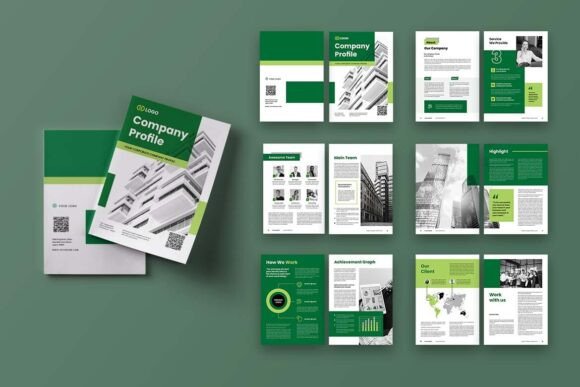
When you need to present your business story with clarity and style, the right document template can make a significant difference. The Green White Modern Company Profile offers a clean, structured foundation for building professional A4-size documents in Adobe InDesign. It's not just another collection of pages; it's a carefully organized layout system that helps you combine images, infographics, and text in a way that feels both polished and approachable.
I've worked with countless templates over the years, and what often separates the useful ones from the rest comes down to how thoughtfully they handle the balance between visual impact and practical usability. This particular template seems to understand that balance well, providing a framework that serves multiple project objectives without forcing you into rigid design constraints.
What Makes This Template Different
At its core, the Green White Modern Company Profile is a 12-page document template designed for Adobe InDesign, complete with both INDD and IDML file formats along with a PDF version. The A4 dimensions (29.7cm x 21cm) make it immediately suitable for international business standards, whether you're printing physical copies or sharing digital versions with clients and stakeholders.
The color palette relies on green and white tones, which naturally conveys growth, freshness, and clarity. This isn't accidental. Green has long been associated with trust and renewal in corporate identity work, and when paired with clean white space, the result is a layout that feels open and uncluttered. For companies in sustainability, finance, health, education, or professional services, this visual direction can reinforce brand messaging without saying a word.
One aspect worth noting is the template's use of smart layers and neatly organized layer structures. In practical terms, this means you're not spending hours hunting through poorly labeled folders just to swap out an image or update a text block. Everything is where you'd expect it to be, which reduces frustration and speeds up the customization process considerably.
Inside the Template Structure
The Green White Modern Company Profile comes with 12 custom pages, including both front and back covers. That might sound modest, but for a company profile document, it hits a sweet spot. You have enough room to cover essential sections without overwhelming your reader with excessive detail. Typical uses might include an executive summary, mission and vision statements, service descriptions, team introductions, project highlights, financial snapshots, and contact information.
The template operates in CMYK color format at 300 DPI, which means it's print-ready from the start. There's a 3 mm bleed included, an often-overlooked detail that prevents white edges from appearing when documents are trimmed professionally. If you've ever received a printed brochure with an unintended white border slicing through your carefully designed graphics, you'll appreciate why this matters.
Font choices lean on freely available options from DaFont or Google Fonts. This is a practical decision that removes the headache of purchasing expensive typefaces or dealing with missing font errors when opening a file. You can download the recommended fonts at no cost and get to work immediately, or swap them out for your own brand typography without breaking the layout structure.
Practical Applications Across Industries
Small business owners frequently need to create professional-looking proposals and capability statements but rarely have the budget for dedicated design teams. The Green White Modern Company Profile gives them a starting point that already looks considered and refined. Rather than building something from scratch in a word processor and hoping for the best, you can populate an existing layout with your content and arrive at a much more polished result.
Freelancers and independent consultants face similar challenges. Whether you're pitching to a potential client or presenting your services at a networking event, a well-structured company profile adds legitimacy. The template's combination of image placeholders and infographic elements means you can showcase portfolio work, highlight key metrics, and tell your professional story in a visually engaging sequence.
Marketing teams within larger organizations might use this template for division-specific profiles or project overviews that need to feel distinct from the main corporate identity while still appearing professional. The green and white scheme offers a fresh departure from typical blue or gray corporate documents, which can help your materials stand out in a stack of proposals on someone's desk.
Educational and nonprofit organizations can also benefit. Grant applications, stakeholder reports, and annual summaries often require a delicate balance of data presentation and narrative storytelling. The infographic capabilities built into the layout allow you to present statistics and outcomes in ways that are immediately understandable rather than buried in dense paragraphs.
Customization and Ease of Use
Adobe InDesign can intimidate newcomers, but templates like this one significantly lower the barrier to entry. Because the Green White Modern Company Profile uses smart layers, you can click into a text area, replace the placeholder content with your own, and see the results instantly. Image frames are set up to accept your photography or graphics without distorting or breaking the layout. Color changes are straightforward if you need to adjust the green tones to match your brand palette.
The inclusion of both INDD and IDML formats is worth mentioning. INDD files work with current InDesign versions, while IDML provides backward compatibility for older software releases. This dual-format approach means you're not locked out of your purchased template if you collaborate with someone running a different version of Creative Cloud.
A note about the images: the preview visuals showing photographs and graphics are for demonstration only and aren't included in the download. This is standard practice for template products, but it's an important detail to keep in mind. You'll need to supply your own images, which is actually preferable since it ensures your final document features authentic visuals rather than stock photography that might appear in someone else's materials.
Real-World Workflow Benefits
Let's talk about time savings. Designing a 12-page layout from scratch, even for someone experienced with InDesign, could easily consume fifteen to twenty hours when you factor in grid setup, page numbering, style definitions, and visual refinement. The Green White Modern Company Profile condenses that process into the time it takes to insert your content and make minor adjustments. For a small business owner or marketing professional juggling multiple priorities, that's a meaningful difference.
The organized layer structure also pays dividends when you return to a document weeks or months later. There's nothing worse than opening an old file and staring at a labyrinth of unnamed layers, trying to figure out where a particular element lives. Clean layer management might not sound glamorous, but it directly impacts how efficiently you can update your company profile as your business evolves.
Consistency across pages is another practical advantage. When you're building a document manually, it's easy to accidentally shift margins, misalign text frames, or use slightly different spacing on different pages. A template enforces visual consistency by design, so your finished document feels cohesive from the front cover through to the back cover.
When to Use This Type of Template
Company profiles serve multiple purposes depending on context. You might prepare a printed version to leave behind after client meetings, attach a PDF version to an email introduction, or upload a digital copy to your website's about section or media kit. The Green White Modern Company Profile adapts to all these scenarios because the A4 format works equally well in physical and digital distribution.
Trade shows and industry events represent another natural application. Having a well-designed leave-behind document that clearly communicates who you are and what you do can keep your organization top of mind long after the event ends. The inclusion of infographic elements allows you to present key performance metrics or project outcomes in digestible visual formats that attendees can absorb quickly.
For startups and growing companies approaching investors, a thoughtfully prepared company profile can complement pitch decks and financial models. The layout's elegant presentation style helps establish credibility before the first substantive conversation takes place, signaling attention to detail and professional standards.
Getting the Most from Your Template Investment
Before diving in, gather your content strategically. Having your written copy, high-resolution images, and any branding guidelines ready before you open InDesign will streamline the customization process. Think about the narrative arc of your company profile. What story do you want the reader to walk away with? A template provides the structure, but your content brings it to life.
Pay attention to image quality as you populate the layout. Since the template is set at 300 DPI, you'll want photographs and graphics that can hold up at that resolution, especially if you plan to print. Low-resolution images that look acceptable on screen may appear pixelated or soft when transferred to paper.
Consider color adjustments thoughtfully. The existing green palette works well as-is, but if your brand uses specific color values, you can modify the template's accent elements to maintain brand consistency. Just be mindful of maintaining sufficient contrast between text and background areas, particularly if you're shifting toward lighter or darker shades.
Testing your output before committing to a large print run always pays off. Export a PDF and review it on different devices, or print a single copy on your office printer to catch any alignment issues or text overflow that might not be visible on screen. Small adjustments at this stage prevent costly reprints later.
Final Observations
The Green White Modern Company Profile fills a specific need in the template marketplace. It addresses the gap between wanting a professionally designed document and having the time, budget, or skills to create one independently. By providing 12 thoughtfully structured pages in industry-standard formats with sensible technical specifications, it gives users a reliable starting point for communicating their organization's value.
There's no single template that suits every possible use case, and this one won't be right for companies with highly complex visual requirements or those needing extensive data visualization beyond basic infographics. But for the majority of small to medium-sized businesses, independent professionals, and organizational teams looking to present their story cleanly and effectively, it offers a practical balance of aesthetics and functionality.
The emphasis on usability through smart layers, organized files, and free font choices suggests that the creators understood their audience well. Most people downloading a company profile template want to spend their time on content strategy and narrative, not wrestling with technical design obstacles. In that respect, this template delivers on its promise.