Chicken Icons: The Minimalist Icon Toolkit for Your Next Project
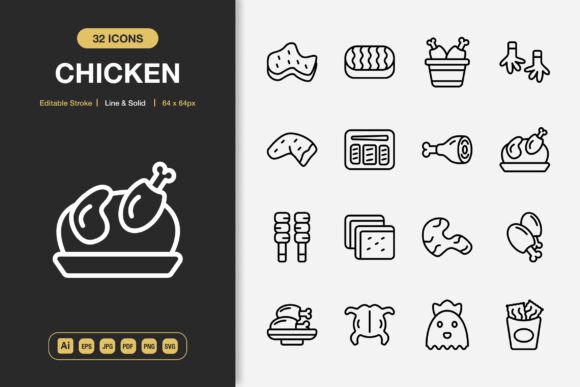
There’s a quiet frustration that happens when you're trying to finish a project and the visuals just don't click. You find an icon set, but the style feels off, the colors are locked, or the resolution is wrong for your app screen. You end up wasting time stitching together assets from different sources, and your design feels inconsistent. Chicken Icons is designed to solve that exact problem. It’s a comprehensive set of high-quality icons built with a minimalist philosophy, giving you a single, reliable resource that adapts to virtually any project you have.
Why Minimalist Design Makes Your Work Better
Minimalism in icon design isn’t just a trend; it’s a practical choice for clarity and versatility. A clean, uncluttered icon communicates its purpose instantly, without distracting the viewer. Whether it’s a tiny button on a mobile interface or a symbolic graphic on a printed flyer, a minimalist icon ensures the message comes first. Chicken Icons embodies this principle. Their simple lines and solid forms integrate seamlessly into different visual environments, from the sleek UI of a productivity app to the bold layout of a social media banner.
Think about the last presentation you made. Icons can guide your audience through information, acting as visual anchors. Using a cluttered, overly detailed icon set can make slides feel busy and hard to follow. With Chicken Icons, you can select a clear ‘download’ symbol or a simple ‘chart’ graphic that reinforces your point without competing with your text. The benefit is a more professional, readable outcome that keeps focus on your content.
Real Situations Where Chicken Icons Become Your Solution
Let’s move beyond abstract benefits and look at where you might actually use these icons tomorrow.
For the Freelancer or Small Business Owner
You’re updating your website or creating a promotional flyer for a local event. You need a consistent visual language that represents your services—maybe a coffee cup for your cafe, a tool for your repair service, or a book for your tutoring sessions. Chicken Icons provides that set. Because the icons come in both line and solid styles, you can match them to your existing brand aesthetic. The editable stroke means you can tweak the thickness in Illustrator to perfectly align with your logo’s line weight, creating a unified look. Instead of your materials feeling like a patchwork of downloaded graphics, they feel like a cohesive, intentional brand presentation.
For the App Developer or Web Designer
Interface design demands precision and scalability. You need an icon that looks sharp on a smartphone home screen (at 96px) and still renders cleanly on a desktop dashboard (at 512px). Chicken Icons includes PNG files at specific, practical sizes like 32px, 64px, 128px, and 256px. This means you’re not resizing a single large file and losing quality; you’re using an asset optimized for that specific pixel dimension. The inclusion of SVG files is crucial here too. SVGs keep your interface sharp on any screen size and allow for easy color changes through code, making your development workflow faster and more flexible.
For the Educator, Blogger, or Content Creator
You’re creating an infographic to explain a complex process, or designing visuals for your online course materials. Icons can break down steps into understandable symbols—a ‘lightbulb’ for an idea, a ‘gear’ for a process, a ‘person’ for a user role. Chicken Icons offers a wide range of these universal symbols. The high quality ensures they don’t look pixelated when embedded in your PDF handout or featured in your video thumbnail. The drag-and-drop convenience means you can quickly experiment with layouts in your design software without dealing with complex import procedures, saving you hours on tight deadlines.
For the Hobbyist or Everyday User
Maybe you’re making a custom poster for a community group, designing a family recipe book, or personalizing a social media campaign for a hobby. You don’t need professional design training to get professional results. The multiple file formats included with Chicken Icons—like JPG for simple placements, PDF for reliable printing, and EPS for compatibility with various programs—mean you can use the icons in the software you already know. The Readme.txt file acts as a straightforward guide, helping you choose the right file for your task.
What Makes Chicken Icons a Practical Investment
When evaluating any resource, you should consider how its features translate into real outcomes for your work. Let’s connect the specifications of Chicken Icons to tangible benefits.
The 100 customizable icons aren’t just a number; they represent a broad enough vocabulary to cover most common needs without being an overwhelming, bloated library. You’ll likely find the symbol you need, but won’t spend hours browsing through thousands of irrelevant options.
The source Adobe Illustrator file is a powerhouse feature for anyone who customizes assets. It means you’re not stuck with a static image. You can change colors, modify shapes slightly to better fit your concept, or combine icons to create a new one. This level of control turns a purchased asset into a foundational tool for your unique creativity.
The EPS Version 10 and SVG files guarantee compatibility. EPS is a standard for print and vector artwork across many professional applications, ensuring your icons work in older or industry-specific software. SVG is the modern standard for web and digital design, enabling scalability and interactivity. Together, they cover you for both past and future projects.
The range of PNG files with transparency directly addresses the need for ready-to-use assets in digital contexts. The transparency means you can place an icon on any background color without a white box around it, which is essential for modern UI design and graphic compositions.
Considering Before You Use Chicken Icons
Like any tool, it’s wise to think about how it fits into your process. Chicken Icons is a minimalist set, so if your project requires highly detailed, photorealistic, or ornate illustrative icons, this might not be the right match. Its strength is in clarity and adaptability across mediums. Also, while the icons are customizable in Illustrator, if you do not have access to or familiarity with vector editing software, your customization will be limited to using the provided PNGs and SVGs in their default styles—which are still highly versatile due to the dual line and solid options.
The best approach is to scan your current and upcoming projects. Do you frequently need clean, simple symbols for digital and print outputs? Do you value having a single, consistent set to pull from, rather than searching for new icons every time? If so, Chicken Icons acts as a foundational asset library, reducing future design friction and helping you maintain a polished visual standard across all your work.
Ultimately, Chicken Icons is about giving you more time to focus on your core message or product, rather than struggling with design inconsistencies. By providing a high-quality, flexible toolkit in multiple formats, it removes a common obstacle for creators, professionals, and everyday users. Your next project—whether it’s a website update, a mobile app screen, a printed poster, or a social media graphic—can benefit from that clarity and efficiency, letting your ideas stand out with clean, supportive visuals.