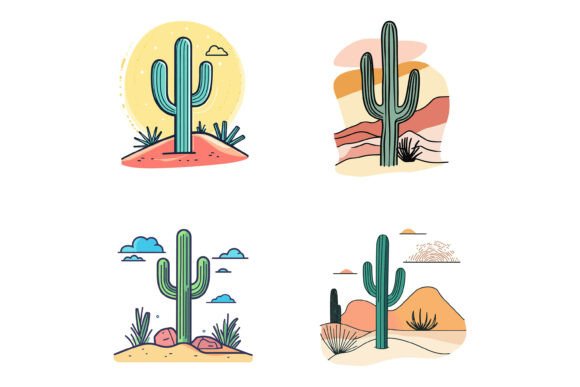
Cactus Vector Graphic Design
There's something about the silhouette of a cactus that just works. Whether it's the crisp geometry of a saguaro against a desert sunset or the soft curves of a prickly pear in a minimalist composition, cactus imagery carries a kind of quiet versatility that designers keep coming back to. Cactus vector graphic design isn't just a fleeting trend inspired by bohemian coffee shop aesthetics or mid-century modern revival. It's become a legitimate staple in visual communication, and for good reason.
At its core, cactus vector graphic design refers to digital illustrations of cacti, succulents, and desert botanicals created using vector software like Adobe Illustrator. These aren't photographs or raster images that fall apart when you scale them up. Vector files maintain crisp edges at any size, which means the same cactus icon that looks sharp on a business card will hold up beautifully on a storefront sign or a billboard. For anyone who's ever tried to stretch a low-resolution image and watched it pixelate into oblivion, that kind of flexibility is a genuine relief.
Where Cactus Vector Illustrations Actually Shine
You might look at a collection of cactus illustrations and think, "These are beautiful, but what would I actually use them for?" The answer is broader than you'd expect. These assets find their way into branding projects, product packaging, editorial layouts, social media content, mobile app interfaces, and even large-format environmental graphics. The key is their ability to communicate different things to different audiences.
For a boutique skincare brand that uses aloe and agave extracts, cactus vector designs on labels and marketing collateral reinforce a natural, desert-derived identity without saying a word. For a tech startup building a productivity app, a tiny saguaro icon in the onboarding flow can convey growth, resilience, and a touch of warmth that generic geometric shapes simply can't match. The same illustration style adapts to wildly different contexts because the visual language of cacti is flexible enough to be playful, elegant, rugged, or sophisticated depending on how it's applied.
Small Business Owners and Brand Makers
If you're running a small business, you know the drill. Every dollar counts, and hiring a custom illustrator for every single visual asset usually isn't in the budget. This is where curated vector collections earn their keep. A well-organized set of cactus illustrations gives you the raw materials to build a cohesive visual identity across your website, social posts, email headers, and even printed materials like thank-you cards or product inserts. You're not starting from a blank canvas each time, but you're also not stuck with rigid, uneditable graphics.
Take a local plant shop, for instance. They could pull a line art cactus from the collection for their Instagram stories, use a solid-color version for their price tags, and adapt a more detailed illustrated specimen for a limited-edition tote bag design. The consistency of the illustration style ties everything together, but the ability to tweak colors means they can shift palettes seasonally or match a new product line without commissioning fresh artwork. That kind of creative control, especially when margins are tight, can make a noticeable difference in how professional a brand feels to its customers.
Event Planners and Stationery Designers
Desert-themed weddings have been popular for years, and they're not showing signs of disappearing. Invitation suites, seating charts, menus, and signage often incorporate botanical elements, and cactus motifs are some of the most requested. A vector-based cactus illustration set allows stationery designers to mix and match elements, adjust line weights, and experiment with color schemes without rebuilding artwork from scratch. If a client wants dusty sage instead of emerald green, or line art instead of filled shapes, those changes happen in moments when the source files are properly structured.
The same principle applies to event branding beyond weddings. A corporate retreat in Arizona, a wellness festival in Palm Springs, or a restaurant's grand opening with a southwestern menu could all pull from the same collection and end up with visuals that feel entirely distinct. The common thread is the quality of the illustration, not a cookie-cutter look that screams "stock image."
Digital Product Creators and App Designers
UI and UX designers often need icon sets, spot illustrations, and onboarding graphics that feel fresh without distracting from the functional purpose of the interface. Cactus vectors occupy an interesting sweet spot here. They're more distinctive than generic geometric icons but more universally recognizable than culturally specific symbols. A weather app that uses cactus imagery to represent arid or hot conditions has personality. A habit tracker that shows a growing cactus as a visualization of streak progress creates a subtle emotional connection that a plain progress bar lacks.
For designers selling digital products like website themes, presentation templates, or printable planners, including high-quality vector illustrations as part of the package can significantly boost the perceived value. A minimalist PowerPoint template comes alive when the section dividers feature tasteful botanical linework. A Shopify theme for a plant-related store feels more complete when the placeholder imagery matches the niche instead of relying on overused stock photography.
What Makes a Vector Collection Actually Practical
Not all vector packs are created equal, and anyone who's downloaded a free set only to find a jumbled mess of unlabeled layers and inconsistent stroke widths knows the frustration. The collections that genuinely save you time and produce professional results share a few common characteristics.
File format matters more than beginners might realize. Having access to AI and EPS source files means you can open them in Adobe Illustrator, Affinity Designer, CorelDRAW, or other major vector editing applications. The inclusion of JPG previews or standalone image files is helpful for quick reference, but the real value lies in the editable originals. You need to be able to ungroup elements, recolor fills, adjust stroke properties, and export at any resolution. Without that flexibility, you're essentially looking at a flat image that happens to have been made with vector software, which defeats the purpose.
Organization is another factor that separates professional-grade collections from hobbyist offerings. Neatly structured files with clear layer names, logically grouped elements, and consistent artboard setups make the difference between finding the right graphic in 30 seconds and spending 15 minutes untangling overlapping paths. For users on both Mac and Windows systems, platform-agnostic organization is essential. File compatibility across operating systems is a given with modern vector formats, but the way files are packaged and labeled can either create friction or eliminate it entirely.
Detail and Consistency at Scale
Perfection in details sounds like marketing fluff until you've worked with illustrations where anchor points are misaligned, curves are lumpy, and the line weight varies from one icon to the next. These issues become glaringly obvious when you place multiple illustrations near each other, which is exactly what happens in infographics, feature comparison tables, or grid layouts. A cohesive collection maintains uniform visual weight, consistent styling choices, and clean geometry throughout every asset. This attention to detail is what allows you to place a prickly pear next to a barrel cactus next to an agave and have them read as part of the same visual family rather than a random assortment.
For someone building an educational infographic about desert ecosystems, this consistency is non-negotiable. Scientific accuracy paired with aesthetic clarity makes complex information digestible. For a food blogger creating recipe cards for cactus-based dishes, consistent illustration quality across ingredients, garnishes, and preparation steps elevates the entire presentation. The illustrations aren't just decoration; they're functional elements that guide the viewer through the content.
Editing, Customization, and Creative Freedom
The ability to edit and modify illustrations according to specific needs is arguably the single most important feature of a vector collection. Colors can be swapped to match brand palettes, individual elements can be isolated and repurposed, and compositions can be rearranged entirely. A cactus with a flower bloom can have that bloom removed for a more minimal look or recolored to coordinate with a seasonal campaign. Thorns can be softened or exaggerated depending on the tone of the project.
This adaptability extends to output formats as well. The same vector illustration can be exported as an SVG for a responsive website, a high-resolution PNG for a printed brochure, or an EPS for placement into a larger design composition. The flexibility to work across print, web, symbols, apps, and infographics from a single source file eliminates the need to hunt down or purchase different versions of the same asset for different mediums.
Consider a freelance designer juggling multiple clients. One day they're creating a mobile app icon set where every pixel matters and clean scaling is critical. The next day they're designing a trade show banner that spans eight feet. Having a single collection that serves both ends of that spectrum without quality degradation is a legitimate productivity multiplier. It's not just about saving money on additional assets; it's about maintaining creative momentum without technical interruptions.
Who Gets the Most Value
Creative professionals who work across multiple disciplines tend to extract the most mileage from these collections. A marketing designer who handles everything from email templates to event signage can build an entire campaign toolkit around a cohesive vector set. A product designer prototyping a new app can use the illustrations as placeholder assets that are actually good enough to ship, eliminating the awkward gap between wireframes and final artwork.
Small business owners with some design savvy benefit significantly as well. Even with tools like Canva lowering the barrier to entry, having access to professional-grade source files opens up creative possibilities that template-based tools restrict. You can build genuinely original compositions instead of rearranging the same preset elements everyone else is using.
Print shops and merchandise creators find these collections useful for on-demand production. A customer orders a t-shirt with a cactus design; having a clean vector source means the graphic can be scaled and color-separated for screen printing without degrading. The same goes for vinyl decals, tote bags, mugs, and any other physical product where crisp lines and solid shapes are non-negotiable.
Things Worth Considering
Not every cactus vector collection is going to fit every project's aesthetic. Some lean heavily into the whimsical, hand-drawn look with organic lines and watercolor-style fills. Others pursue hyper-minimalism with geometric precision and limited color palettes. Before investing in a set, it's worth auditing your typical output and honestly assessing whether the style aligns with your brand or your clients' expectations. A collection that looks gorgeous in isolation but fights against every layout you put it into isn't a practical asset.
There's also the question of uniqueness. Popular vector sets get downloaded by thousands of users, and while editing capabilities let you customize heavily, the underlying structure of the illustrations remains the same. For projects where visual distinctiveness is paramount—like a flagship brand identity or a product that will be widely distributed—commissioning exclusive custom illustrations may be the better long-term play. For the vast majority of commercial and personal projects, however, well-designed vector collections provide an ideal balance of quality, flexibility, and value.
Licensing terms deserve a careful read too. Most commercial collections allow broad usage across personal and client projects, but restrictions sometimes apply to reselling the illustrations as standalone assets or incorporating them into logo designs that get trademarked. Understanding these boundaries upfront prevents headaches later, especially if you're building assets that will live in the wild for years.
The truth is, cactus vector graphic design has carved out a permanent place in the visual toolbox for a reason. It offers a blend of organic warmth and structural clarity that few other botanical subjects can match. When the illustrations are well-crafted, properly organized, and genuinely editable, they stop being mere decoration and start functioning as versatile building blocks for all kinds of creative work. Whether you're polishing a brand identity, building an app interface, designing wedding stationery, or crafting social media content that actually stops the scroll, having a reliable collection of cactus vectors at your disposal is one of those quietly powerful advantages that makes the creative process feel a little less constrained and a lot more enjoyable.